
Build online safety with your teenager
Online safety for your teenager works best as a household practice rather than a single blocking setting. Teenagers aged 14–17 often use smartphones and other technology to socialise and learn about the world, so safer use has to fit ordinary communication, entertainment and independence as well as moments of risk. Your aim is not to create a system that promises complete protection; it is to build several practical layers that your teenager understands and can use.
A useful plan has four parts:
- Conversation: make it clear that your teenager can come to you when something online feels uncomfortable, confusing or worrying.
- Shared expectations: agree how your household will handle privacy, screen use, purchases, live features and unsuitable content.
- Targeted controls: use device, app, account or home-network settings for the specific problem you are trying to manage.
- Review: revisit the arrangement when your teenager starts using a new device, app, game or service, or when the existing boundary no longer fits.
These layers have different jobs. Conversation gives your teenager somewhere to turn; an agreement makes expectations visible; a control can reduce a defined type of access or activity; and review helps you notice when the arrangement has stopped matching everyday use. No single setting can take over all four roles.
The sections that follow help you decide which layer belongs where. Practical controls can reinforce that support as your teenager’s online life changes, but they cannot replace the conversation.
Identify the situations your household needs to handle
Your household needs to identify the online situations that could affect your teenager before you choose a setting. UK online-safety guidance covers misinformation, pornography, sexting, social media, online challenges, parental controls, screen time and reporting harmful content. Other potential risks include inappropriate content, cyberbullying, online predators, risky purchasing, misleading information and recommendation systems that can keep young people scrolling or expose them to unhealthy content.
Use those categories as prompts, not as a reason to assume that every teenager faces every risk. Ask which situations are relevant to your teenager’s actual routine:
- Content: Could unsuitable or misleading material appear through a site, feed, search or recommendation?
- Contact: Can your teenager chat, voice-chat or play with people they do not know?
- Sharing: Does your teenager understand what to check before posting images or videos, and which privacy settings apply?
- Time and attention: Is screen use interfering with sleep, family life, schoolwork or other activities in a way your household needs to address?
- Money: Could a game or app lead to an accidental purchase or a charge that you do not recognise?
- Pressure or harm: Has your teenager encountered bullying, coercion, sexual content, an online challenge or something else that feels worrying?
Turn a broad concern into a specific boundary. Instead of writing “make social media safer”, write “we need to understand who can contact you on this account” or “we need to reduce access to unsuitable content on devices using the home connection”. That wording gives you something you can discuss, set up and review.
The right response depends on the situation. A content concern may call for a filter; a privacy concern may call for account settings and a conversation; a contact concern may require attention to live chat or voice features. Write down the specific boundary you want to create before selecting a control, and take action on that boundary rather than trying to restrict the whole internet.
Start with conversation and disclosure
Conversation with your teenager is the first safety layer because disclosure depends on knowing where to turn. Talk about online safety before a new device or game is used, and say plainly that your teenager can come to you if something feels uncomfortable, confusing or worrying. Using digital devices together can make it more natural for your teenager to turn to you after an upsetting online experience.
Choose a calm moment rather than waiting for a problem. You might look at a game together, ask how a new app works or discuss what your teenager enjoys about a service. The purpose is to understand the activity well enough to agree sensible boundaries, not to make every conversation feel like an inspection.
Try questions such as:
- What do you enjoy doing on this app, game or site?
- Who can contact you, chat with you or join your games?
- Which privacy settings have you chosen, and what do they change?
- What would you do if someone asked for personal information, an image or money?
- What would you do if something online made you uncomfortable?
- Which part of this service would you like help understanding?
Spend some time using digital services together where that feels appropriate. You can look at a game’s live chat, a service’s privacy options or the route for reporting harmful content without presenting the activity as a search for wrongdoing. Your teenager may understand a rule more readily when you explain the situation it is meant to handle and invite their view on how it should work.
The practical boundary is clear: tell your teenager that asking for help will be met first with listening and support, then work together on the next action. If the first response is always punishment or immediate loss of access, your teenager may be less willing to disclose a worrying experience. Keep the conversation open while you decide whether a rule, setting or further help is needed.
Turn shared expectations into a family agreement
A family agreement gives your household a shared way to discuss internet use and agree expectations for behaviour at home, at school and at friends’ houses. Creating it together can make the rules clearer than announcing a list of restrictions after a problem occurs. The agreement should describe what everyone will do, including the adults in the household, rather than treating online safety as your teenager’s responsibility alone.
Use the agreement to cover the areas that match your household:
- Screen use: decide how your household will notice when technology is interfering with family life and what happens next.
- Privacy: agree what to check before posting images or videos, how privacy settings will be used and how strong passwords will be handled.
- Live and disappearing features: discuss what makes livestreaming and disappearing content harder to judge, and what your teenager should do before using them.
- Contacts: set out who your teenager can talk to or play with online and what to do when an unfamiliar person wants contact.
- Content: agree how you will decide whether a website, app, game or device is suitable for your household.
- Information: agree what to do when something online seems unreliable or untrustworthy.
- Spending: decide how your teenager can avoid accidental spending in a game or app and how a possible purchase should be raised.
Make each rule observable. “Use the internet responsibly” is difficult to apply, while “ask before spending in a game” or “tell an adult when someone asks for an image” gives your teenager a clear action. Add what the adults will do too, such as listening before deciding on a consequence or explaining why a setting has changed.
Put the agreement somewhere you can revisit it, not somewhere it becomes a one-off contract. Ask your teenager what feels workable, explain the reason for each boundary and record the action to take when a rule is unclear or broken. Apply the same basic standards to adults where possible, then review the agreement as the devices, services and routines in your household change.
Make settings support negotiated independence
Controls are most useful when they support a conversation about growing independence. Teenagers aged 14–17 often use smartphones and other technology to socialise and learn about the world, so parents and carers can work with them to make those experiences safer. The household goal is a shared understanding of expectations, privacy and support, rather than a collection of settings that a teenager does not understand.
Put the family agreement before the settings. Ask your teenager to help create clear expectations for online behaviour at home, at school and at friends’ houses. The agreement can cover screen use, privacy settings, strong passwords, livestreaming, disappearing content, unreliable information and spending in games or apps. It should also make clear that your teenager can come to you if something online feels uncomfortable, confusing or worrying.
Use settings to support an agreed boundary. A control is useful when it addresses a point already understood by the household, not simply because the option is available. Examples include:
- A content filter can help reduce access to potentially harmful or age-inappropriate content on devices or a home network.
- Depending on the device, app or game, screen-time tools may provide reports across apps and devices, set daily limits or show weekly playtime reports.
- App and service settings may restrict built-in apps or features, so the available options need to be discussed in the context of the service your teenager uses.
- Reviewing live chat, voice chat and interaction with strangers can help the family agree how to handle uncomfortable contact.
- Privacy settings, strong passwords and a conversation about what to check before posting support safer sharing; a setting cannot decide whether a particular message, image or conversation is wise.
- Parental-control options may help prevent unrecognised online purchases, alongside an agreement that your teenager will ask before spending in a game or app.
Keep the teenager involved in the response. Talk through what a setting changes, what remains a matter of judgement and what your teenager should do after seeing something upsetting. Using digital devices together can make it more natural for a child to turn to a parent or carer after an upsetting online experience. That conversation matters alongside any filter, report or limit; no setting can replace the agreed response and support.
Review the agreement as independence changes. Controls vary by service, and the relevant options may change when a teenager starts using a different device, app or game. Revisit the family agreement with your teenager, check whether the privacy and contact expectations still make sense, and adjust settings that support those expectations. This keeps the plan focused on trust, disclosure and practical support rather than treating more restrictions as the answer.
Check the device, app, account or network where access happens
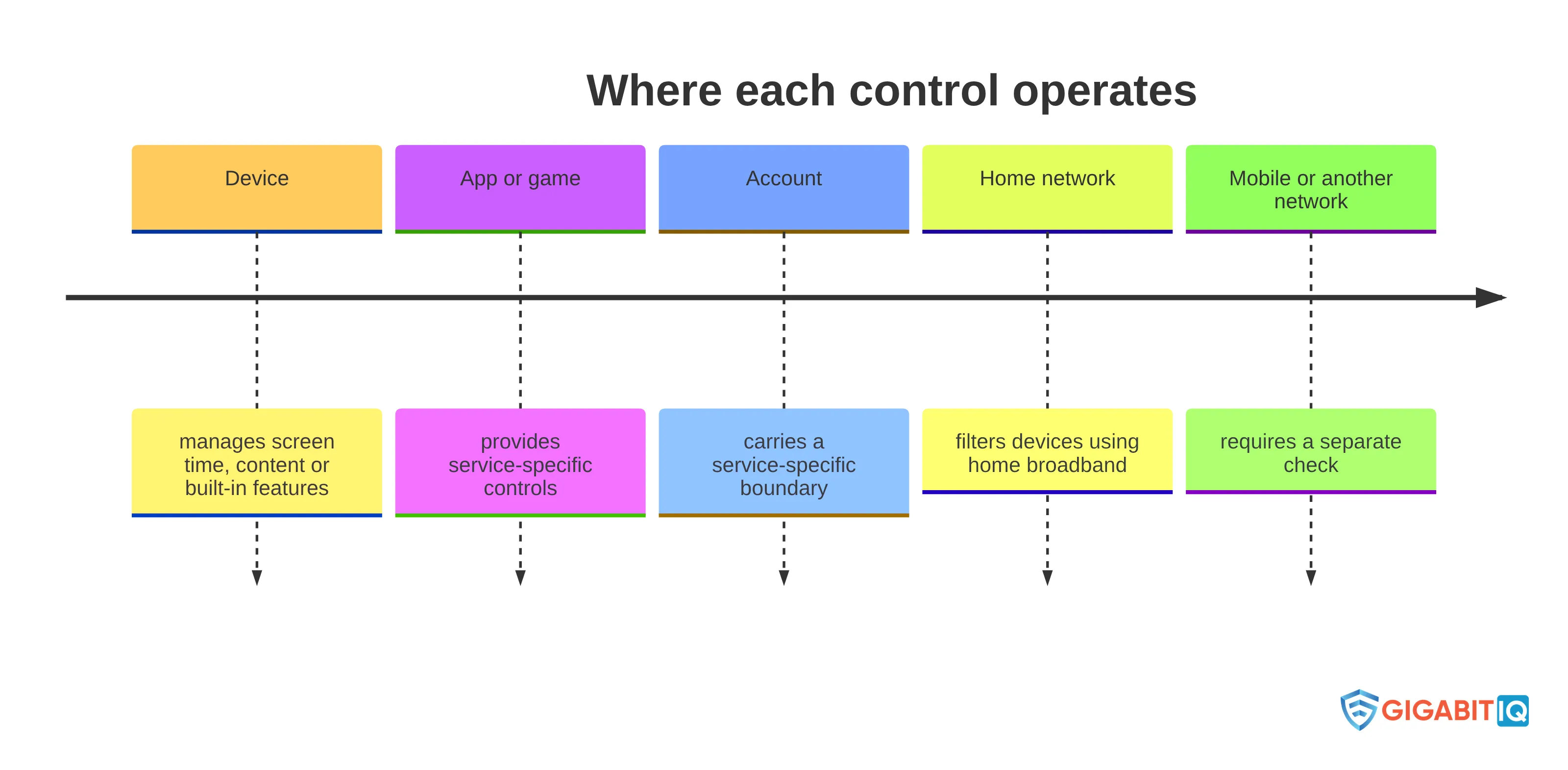
The access route determines which control can affect your teenager’s activity. A home-network filter can apply to devices using that broadband service, but it does not cover the same teenager’s mobile data use. Check the layer before you judge whether a control has worked.
Use this route check:
- Device: identify the phone, tablet, computer or console your teenager uses. Device settings may manage screen time, content or built-in features on that hardware.
- App or game: check the controls inside the particular service, including screen-time options, privacy settings and live or voice features where available.
- Account: check which profile or account carries the setting. A service-specific boundary may apply to one account rather than every account on the device.
- Home network: consider a network-level filter when the concern relates to devices using your home broadband connection.
- Mobile or another network: check separately when your teenager uses 3G, 4G or 5G, or connects at a friend’s house. A home broadband control does not cover those connections.
The same activity can move between these layers. For example, a screen-time limit may belong to an app or device, while content filtering may belong to the device or home network. A control that works for one service may also offer different options from a control on another service, so avoid assuming that two settings with similar names do the same job.
Check the particular device, app, game or service instead of assuming that one control applies everywhere, then record which route your household rule covers. If you cannot explain where the setting operates, do not describe it to your teenager as a boundary for every device or connection.
Use home-network protection as one supporting layer
Home-network protection is useful when the boundary concerns devices using your household broadband connection. Network-level filters offered by an internet service provider can help protect devices that use the home broadband service, while device-level controls can travel with a particular phone, tablet or computer. Treat the network layer as one part of the arrangement, not as a replacement for account settings, device settings or conversation.
Gigabit IQ offers fully managed Wi-Fi, FamilyGuard+ parental controls and CyberGuard+ cybersecurity features. These are business-specific services, so consider them only against the home-network gap you have already identified.
Before choosing a network layer, write down what you want it to handle:
- Which devices normally use the home broadband connection?
- Is the concern about content, screen use, risky apps or connected-device security?
- Which activity still needs a device, app or account setting?
- What will your teenager do when using mobile data or another household’s connection?
A home-network control has a defined boundary. It does not cover mobile data such as 3G, 4G or 5G, and it may not apply when your teenager uses another household’s connection. Explain the boundary, agree what your teenager should do when access moves outside the home and keep the relevant device or account settings in place. Choose this layer when it solves a clear home-connection problem, not because one network setting appears simpler than a household plan.
Test the gaps before relying on the arrangement
A control arrangement needs a coverage check before you rely on it. Home broadband controls do not cover mobile data, and they may not apply when your teenager uses another household’s connection. VPNs can also make it harder for parents and schools to manage access to online content and can reduce visibility into online behaviour; some free VPNs may carry malware, track activity or misuse data.
Check the arrangement in the ordinary routes your teenager uses:
- Test the household device while it is connected to your home broadband.
- Check whether the same device can use mobile data and identify which household rule applies there.
- Consider what happens when your teenager uses a friend’s connection, a school connection or another device.
- Check the relevant app, game and account settings rather than assuming the home network covers them.
- Discuss VPNs openly, including why an unapproved or free service can change the visibility and control your household expects.
- Check what reports or limits the selected device, app or game actually provides before promising your teenager that a feature will measure something specific.
Keep a short coverage note for each concern: the activity, the control layer, the connection it covers and the household action when it does not apply. This can prevent a setting for the home router being mistaken for a setting on your teenager’s phone or account. It also gives you a clear starting point when something changes.
The aim is not to search for ways around a boundary. The aim is to know where the boundary applies, explain that scope honestly and identify the next household action when your teenager moves outside it. If a control leaves a route uncovered, add the appropriate device, app or account practice rather than describing the arrangement as complete.
Review the plan as your teenager’s online life changes
Your teenager’s online life changes when a new device, app, game or service becomes part of the routine, so the household plan needs regular review. Control options differ between services, and a setting that addressed one activity may not address the next. Review the arrangement when the activity changes, when a control causes an unexpected restriction or when your teenager raises a new concern.
Use each review to ask four direct questions:
- What does your teenager use now that was not covered by the previous agreement?
- Which contact, content, privacy, time or spending boundary matters for that activity?
- Does the relevant control sit on the device, app, account or home network?
- What should your teenager do if the setting does not work, access moves to another connection or something online feels worrying?
Review the arrangement after a new device or service enters the household, after a change in the way your teenager uses an existing service, and after a concern exposes a gap. You do not need to rewrite every rule each time. Keep the parts that still fit and change the specific boundary, setting or response that no longer does.
Keep the review collaborative. A family agreement works as a continuing conversation about expectations and boundaries, while using devices together can keep it natural for your teenager to raise an upsetting experience. Adjust the rule, setting or support that no longer fits, and tell your teenager what changed and why. A review is complete when you have a current boundary, a known control layer and a clear response if the concern appears again.
Recognise when household measures are not enough
A household setting is not enough when your teenager discloses harm that needs a response beyond changing access. Online risks can include cyberbullying, online predators, inappropriate content, misleading information and recommendation systems that may expose young people to unhealthy content or prolonged scrolling. UK online-safety guidance also identifies sexting, coerced online child sexual abuse and reporting harmful content as issues that families may need to address.
Use the nature of the concern to decide when to move beyond ordinary household measures:
-
If your teenager says that something online feels uncomfortable, confusing or worrying, stop treating the issue as a settings problem and listen carefully.
-
If the concern involves cyberbullying, contact from an online predator, coerced sexual content or another form of harm, seek support beyond a filter rather than relying on a technical change alone.
-
If a technical boundary has failed, record what happened and address the affected device, app, account or network, but do not present that adjustment as the whole response.
Do not promise your teenager that changing a password, blocking an account or switching on a filter will resolve harm that has already occurred. Those actions may form part of the response, but the situation may also require support suited to what happened. Keep the immediate conversation focused on safety, support and the next appropriate action.
Your teenager should know that reporting a problem will not be reduced to blame for using the service. Household controls can reduce some exposure; they cannot resolve harm that has already occurred or replace help suited to the situation.
Choose a safer-broadband layer for a defined home-network gap
Consider a safer-broadband layer when you have identified a home-network concern that needs support alongside conversation, a family agreement and device or account settings. Start with the boundary: decide whether you need help with harmful content, screen-time management, risky apps or social media, or connected-device security.
Use this final check before moving forward:
- Name the specific home-network concern.
- List the devices and connections it needs to cover.
- Keep device, app and account settings for concerns the network layer cannot reach.
- Explain the boundary to your teenager and agree what happens outside it.
- Keep a conversation and review process alongside the technical setting.
At Gigabit IQ, we offer safer broadband for families, fully managed Wi-Fi, FamilyGuard+ parental controls and CyberGuard+ cybersecurity features. Use those services as one defined part of your household plan, not as a substitute for trust, disclosure, review or support when a concern goes beyond routine settings. A qualified professional should decide individual suitability where a safeguarding, mental-health, legal or other professional concern is involved.
If your defined gap is on the home network and this layer fits your household plan, take the next step.
What should parents check before changing a teenager’s online-safety settings?
What are the main online risks for teenagers?
Teenagers may face various online risks including inappropriate content, cyberbullying, online predators, misleading information, and excessive screen time. It’s important to discuss these risks with your teenager to help them navigate their online experiences safely.
How can I create a family agreement for online safety?
A family agreement should outline shared expectations for online behavior, including screen use, privacy settings, and who your teenager can interact with online. Involve your teenager in creating this agreement to ensure it reflects everyone’s views and is more likely to be followed.
What types of parental controls should I consider for my teenager?
Consider using device, app, and network-level parental controls to manage content access and screen time. Each type of control serves different purposes, so choose the ones that best address your specific concerns.
How can I ensure my teenager feels comfortable discussing online issues with me?
Encourage open conversations about online safety by discussing potential risks before they arise. Make it clear that your teenager can come to you with any concerns without fear of punishment, fostering a supportive environment.
What should I do if my teenager encounters harmful content online?
If your teenager encounters harmful content, listen to their concerns and provide support. Depending on the situation, you may need to take further action, such as reporting the content or seeking professional help.
How often should I review our online safety plan?
Regularly review your online safety plan, especially when your teenager starts using new devices, apps, or services. This ensures that the plan remains relevant and effective as their online activities change.
What is the role of home-network protection in online safety?
Home-network protection can help filter harmful content and manage screen time for devices connected to your home broadband. However, it should be used alongside conversations and agreements, not as the sole measure of safety.


